Kanad
|

About

Projects

Blogs

Contact

|

©2026 / Kanad Shee/ Building Scalabale Products

©2025 / Kanad Shee

On This Page

JavaScript Core Concepts - Deep Dive

Wednesday, January 14, 2026

•

By Kanad Shee - Full Stack Developer

Master JavaScript fundamentals with in-depth explanations of most of the core concepts

JavaScript Core Concepts - Deep Dive

Deep Dive into JavaScript

A comprehensive guide to mastering JavaScript fundamentals from execution context and closures to async patterns and the this keyword.

Understanding JavaScript at a deep level is what separates developers who merely use the language from those who truly master it. While it's easy to write functional JavaScript code, grasping the underlying mechanics—how the engine executes code, manages memory, and handles asynchronous operations—unlocks a new level of problem-solving ability and code quality.

In this comprehensive guide, I've compiled everything you need to understand JavaScript's core concepts that form the foundation of modern web development. From the often-misunderstood hoisting mechanism to the powerful patterns enabled by closures, from the event loop's asynchronous nature to the nuanced behavior of the this keyword—these are the concepts that appear in every interview, every code review, and every production application.

What makes JavaScript truly fascinating is how its execution model differs from traditional programming languages. Understanding concepts like the call stack, lexical environment, and scope chaining isn't just academic knowledge—it's what helps you debug complex issues, optimize performance, and write predictable code. The temporal dead zone, block scope, and closure patterns are not just interview questions; they're the mechanisms that power modern JavaScript frameworks and libraries.

This guide takes you through practical examples and real-world scenarios that demonstrate each concept in action. You'll learn how promises and async/await revolutionized asynchronous programming, how higher-order functions enable functional programming patterns, and how map, filter, and reduce make array transformations elegant and declarative.

Whether you're preparing for technical interviews, debugging production issues, or simply want to write better JavaScript code, this deep dive covers the essential concepts that every JavaScript developer must master. Each section includes working code examples, common pitfalls, and best practices derived from real-world experience.


Introduction

This guide walks you through JavaScript's fundamental concepts that power modern web development:

  • Hoisting & Execution Context - How JavaScript processes code before running it
  • Scope, Lexical Environment & Scope Chaining - Variable accessibility and closure mechanisms
  • let, const & Temporal Dead Zone - Modern variable declarations and their behavior
  • Block Scope & Shadowing - How blocks create new scopes and variables interact
  • Closures - Functions bundled with their lexical environment
  • Event Loop & Asynchronous JavaScript - How JavaScript handles non-blocking operations
  • Callbacks, Promises & Async/Await - Evolution of asynchronous patterns
  • Higher Order Functions - Functions that operate on other functions
  • Map, Filter & Reduce - Functional array transformation methods
  • The this Keyword - Context binding in different scenarios

Hoisting

Hoisting is a behavior where variable and function declarations are conceptually moved to the top of their current scope during the compilation phase, before the code is executed. This allows accessing variables and methods before they are initialized in the code.

console.log(a);
console.log(getName);
getName();

var a;

function getName() {
  console.log('Kanad Shee');
}

Functions and Execution Context

A function in JavaScript is a reusable block of code that performs a specific task or calculates a value. Functions are fundamental building blocks that help organize code, make it modular, and avoid repeating logic.

var x = 1;
a();
b();
console.log(x);

function a() {
  var x = 10;
  console.log(x);
}

function b() {
  var x = 100;
  console.log(x);
}

Window and This Keyword

If we don't write anything in code, a global object will still be created along with the Global Execution Context. In browsers, this is the window object. Anything written at the top level (not inside any functions) will be attached to this window object.

var random = 10;

function check() {
  var something = 100;
}

console.log(random);
console.log(window.random);
console.log(this.random);

Undefined vs Not Defined

Undefined

Undefined is a special keyword assigned to a variable until a value has been initialized. JavaScript allocates memory for that variable in the Memory Allocation Phase.

var u;
console.log(u);

if (u === undefined) {
  console.log('U is undefined!');
} else {
  console.log('U is not undefined!');
}

Not Defined

This means accessing a variable or function which doesn't exist in the code. The JS engine will not allocate any memory for it and will show an error.

console.log(not_defined);

Scope and Lexical Environment

Scope

Scope defines where we can access specific variables and functions in our code.

function a() {
  var d = 10;
  c();
  function c() {
    var e = 20;
    console.log(d);
    console.log(b);
  }
}

var b = 10;
a();

Lexical Environment

Lexical Environment is the local memory and the lexical environment of its parent.

Scope Chaining

The way of finding the value for a variable in local memory along with its parent lexical environment is known as Scope Chaining.
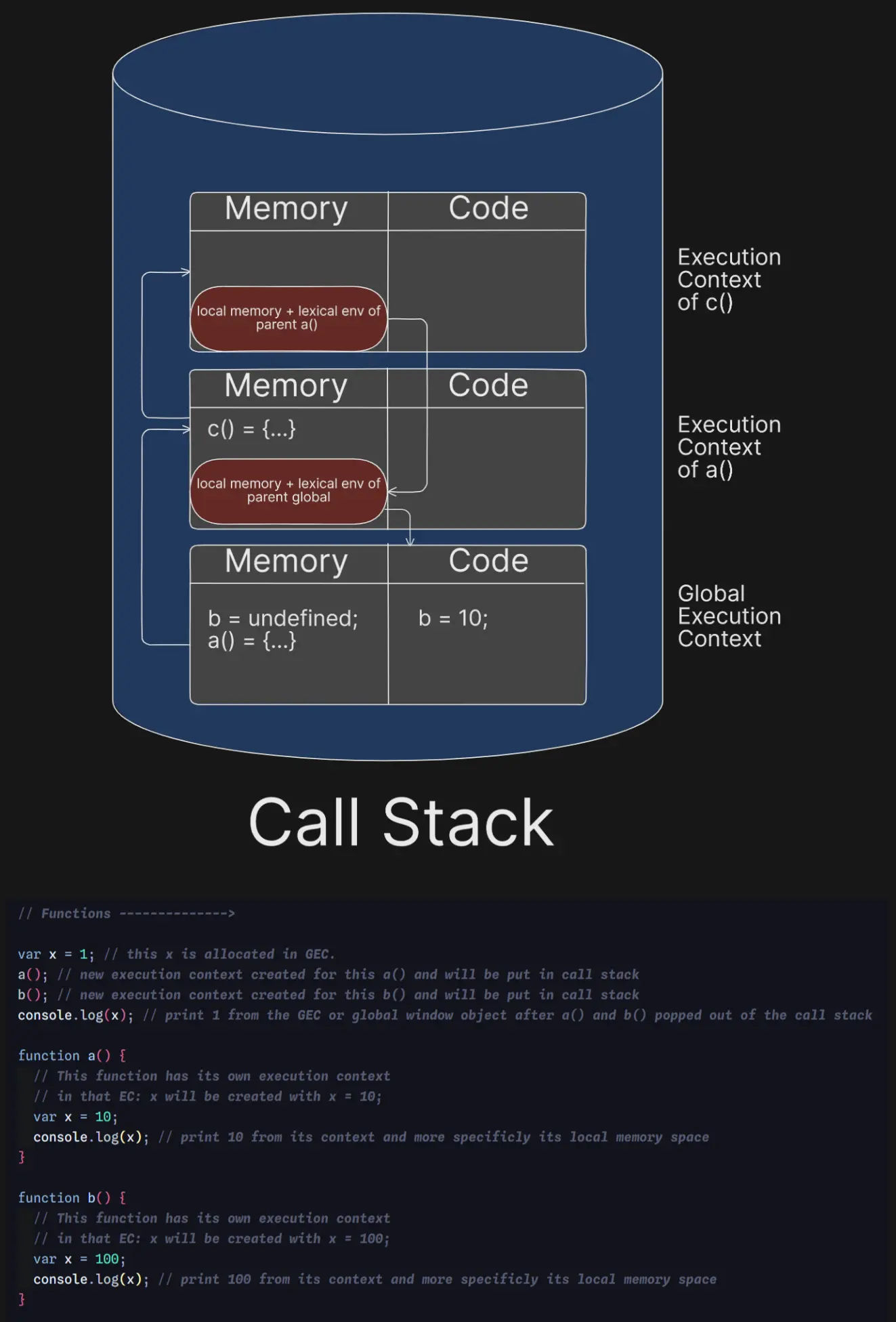
Scope Chaining

let, const and Temporal Dead Zone

let

Using let, when we declare any variable, it allocates memory but not in the global object. It's stored in a separate memory space, and we can't access that value before it has been initialized.

const

In case of const, everything is similar to let, but we must initialize it with a value immediately.

let x;
x = 5;

let a = 10;
console.log(a);

const t = 2154;

console.log(some);
let some = 'Value';

Block Scope and Shadowing

Block

A block is used to combine multiple statements in a group. It is also known as a compound statement.

{
  var a = 10;
  console.log(a);
}

if (true) {
  var a = 10;
  console.log(a);
  alert('a is printed');
}

Block Scope

All the variables and functions we can access inside a block is known as block scope.

{
  var a = 10;
  let b = 20;
  const c = 30;
  console.log(a);
  console.log(b);
  console.log(c);
}

console.log(a);
console.log(b);
console.log(c);

Shadowing

var p = 50;

{
  var p = 10;
  console.log(p);
}
console.log(p);

let q = 540;
{
  let q = 140;
  console.log(q);
}
console.log(q);

Illegal Shadowing

Shadowing occurs when an inner variable has the same name as an outer variable. It becomes illegal when a var declaration tries to redeclare a variable that was already declared with let/const in the same scope.

function check() {
  let a = 45;
  {
    var b = 54;
    console.log(b);
    console.log(a);
  }
}

check();

Closure

Functions along with its lexical environment forms a closure.

function x() {
  var a = 7;
  function y() {
    console.log(a);
  }
  y();
}
x();

When we return a function, it doesn't just return the function—it comes as a bundle along with its lexical scope as a closure. This is why values remain accessible.

function a() {
  var x = 10;
  function b() {
    console.log(x);
  }
  return b;
}

var c = a();
c();

Nested Closures

function one() {
  let val1 = 7;
  function two() {
    let val2 = 70;
    function three() {
      console.log(val2, val1);
    }
    three();
  }
  two();
}
one();

setTimeout with Closures

function x() {
  for (var i = 1; i <= 5; i++) {
    setTimeout(() => {
      console.log(i);
    }, i * 1000);
    console.log('Loop runs');
  }
  console.log('Checked');
}

x();

JavaScript does not wait for setTimeout. All 5 callbacks form closures over the same i variable, so they all see the final value of i which is 6.

Solution using let

function x() {
  for (let i = 1; i <= 5; i++) {
    setTimeout(() => {
      console.log(i);
    }, i * 1000);
  }
}

x();

Solution using Helper Function

function x() {
  for (var i = 1; i <= 5; i++) {
    function printI(val) {
      setTimeout(() => {
        console.log(val);
      }, val * 1000);
    }
    printI(i);
  }
}

x();

First Class Functions

Anonymous Function

A function without a name is an anonymous function.

Function Statement

function a() {
  console.log('a called');
}

Function Expression

var b = function () {
  console.log('b called');
};

Named Function Expression

var p = function xyz() {
  console.log('Named function expression');
};

Parameters vs Arguments

var func1 = function add(num1, num2) {
  console.log(num1 + num2);
};

var res = func1(10, 20);

num1 and num2 are parameters. 10 and 20 are arguments.

Arrow Functions

Introduced in ES6, arrow functions provide a concise syntax and have lexical this binding.

Callback Functions

Functions are first class citizens in JavaScript. We can pass one function into another function. The function passed as an argument is known as a callback function.

setTimeout(function () {
  console.log('timer');
}, 5000);

function x(y) {
  console.log('x');
  y();
}

x(function y() {
  console.log('y');
});

Event Listeners with Closures

function checkEventListeners() {
  let count = 0;
  document.getElementById('clickMe').addEventListener('click', function () {
    console.log('Button Clicked!');
    console.log(`Value of count is: ${++count}`);
  });
}

checkEventListeners();

Memory Management

Closures keep their scope with them, so values remain attached. It's a good practice to remove event listeners to prevent memory leaks.

Event Loop and Asynchronous JavaScript

Promises and Mutation Observer go to the Microtask Queue. Web APIs callback functions go to the Callback Queue.

When all tasks from the Microtask Queue are completed, only then the Callback Queue's tasks will be executed.

Starvation

When there are many tasks in the microtask queue and few in the callback queue, the callback queue has to wait. This waiting period is known as Starvation Time of Callback Queue.

setTimeout Trust Issues

JavaScript uses a Concurrency Model where the call stack, event loop, and callback queue decide how code executes.

console.log('Start');

setTimeout(() => {
  console.log('Log in set timeout');
}, 5000);

const startDate = new Date().getTime();
let endDate = startDate;

while (endDate < startDate + 10000) {
  endDate = new Date().getTime();
}

console.log('End');

Higher Order Functions

Functions which take other functions as arguments or return a function are known as Higher Order Functions.

function x() {
  console.log('Function X');
}
function y(x) {
  x();
}

Calculate Example

const area = function (radius) {
  return Math.PI * radius * radius;
};

const circumference = function (radius) {
  return 2 * Math.PI * radius;
};

const diameter = function (radius) {
  return 2 * radius;
};

const calculate = function (data, operation) {
  const res = [];
  data.forEach((element) => {
    const computedValue = operation(element);
    res.push(computedValue);
  });
  return res;
};

const radius = [10, 20, 30, 40];

console.log(calculate(radius, area));
console.log(calculate(radius, diameter));
console.log(calculate(radius, circumference));

Custom Map Polyfill

Array.prototype.calculateArea = function (operation) {
  const res = [];
  this.forEach((val) => {
    res.push(operation(val));
  });
  return res;
};

const areaRes = radius.calculateArea(area);
console.log(areaRes);

Map, Filter, and Reduce

map()

Map takes an array and performs an operation on each item, returning a transformed array.

const arr = [10, 20, 30, 40];

function double(val) {
  return val * 2;
}

const doubledRes = arr.map(double);
console.log(doubledRes);

filter()

Filter is a higher order function which filters values according to a condition and returns the filtered result.

const ageValues = [10, 54, 21, 17, 16, 24, 22];

const adultOnes = ageValues.filter((age) => age >= 18);
console.log(adultOnes);

reduce()

Reduce runs a callback function on each element of the array, passing the return value from the calculation on the preceding element. The final result is a single value.

const values = [10, 20, 30, 40, 50, 60, 87];

const output = values.reduce(function (acc, curr) {
  acc = acc + curr;
  return acc;
}, 0);

console.log(output);

const maxVal = values.reduce(function (max, curr) {
  if (curr > max) max = curr;
  return max;
}, values[0]);

console.log(maxVal);

Practical Examples

const users = [
  { firstName: 'Kanad', lastName: 'Shee', age: 26 },
  { firstName: 'Sudip', lastName: 'Maity', age: 28 },
  { firstName: 'Aditya', lastName: 'Mondal', age: 30 },
  { firstName: 'Koushik', lastName: 'Shee', age: 26 },
];

const fullNames = users.map((eachUser) => {
  return eachUser.firstName + ' ' + eachUser.lastName;
});

console.log(fullNames);

const ageChkPoint = users.reduce(function (acc, curr) {
  if (acc[curr.age]) {
    acc[curr.age] += 1;
  } else {
    acc[curr.age] = 1;
  }
  return acc;
}, {});

console.log(ageChkPoint);

const filteredRes = users
  .filter((user) => user.age < 30)
  .map((resultantUser) => {
    return resultantUser.firstName;
  });

console.log(filteredRes);

Callback Problems

Callback Hell

Deeply nested callbacks make code hard to read and maintain.

const itemsInCart = ['nike_shoe_3x45e', 'jeans_jk43', 'shirts_45ty'];

api.createOrder(cart, function () {
  api.proceedForPayment(function () {
    api.showOrderDetails(function () {
      api.updateUserWallet();
    });
  });
});

Inversion of Control

Inner callback functions are directly dependent on the outer function, which means we're trusting that function blindly.

Promises

const cartItems = ['shirts', 'pants', 'shoes', 'watches'];

createOrder(cartItems, (order_id) => {
  proceedToPayment(order_id);
});

const promiseObj = createOrder(cartItems);

promiseObj.then((order_id) => {
  proceedToPayment(order_id);
});

A Promise in JavaScript is an object that represents the eventual completion or failure of an asynchronous operation.

Promise States

  • Pending: The initial state, neither fulfilled nor rejected
  • Fulfilled: The operation completed successfully
  • Rejected: The operation failed

Promise Chaining

Promise chaining executes multiple asynchronous operations in sequence, where the output of one .then() is passed as input to the next.

const cartItems = ['shirts', 'pants', 'shoes'];

createOrder(cartItems)
  .then((orderId) => proceedToPayment(orderId))
  .then((paymentInfo) => showOrderSummary(paymentInfo))
  .then((paymentUpdate) => updateWalletBalance(paymentUpdate));

Promise Example

const createOrder = (cartItems) => {
  const pr = new Promise((resolve, reject) => {
    const orderId = '64g65e4g6wgr.^&';
    if (orderId) {
      setTimeout(() => {
        const obj = {
          message: 'Order has been created!',
          success: true,
          _id: orderId,
        };
        resolve(obj);
      }, 5000);
    } else {
      reject('Something went wrong!');
    }
  });

  return pr;
};

const promise = createOrder(['shoes', 'shirts', 'pants']);

promise
  .then((order) => {
    console.log(order);
    return order._id;
  })
  .catch((err) => {
    console.log('Error: ', err.message);
  })
  .then((orderId) => {
    return proceedToPayment(orderId);
  })
  .catch((err) => {
    console.log('Payment failed!');
  });

Async and Await

async

The async keyword creates async functions. It always returns a promise. If we return a value, it will automatically wrap that value inside a promise.

async function getData() {
  return 'Normal Value';
}

const dataPromise = getData();
dataPromise.then((res) => console.log(res));

const newPr = new Promise((resolve, reject) => {
  resolve('Promise is resolved!');
});

async function getPromiseData() {
  return newPr;
}

const prResp = getPromiseData();
console.log(prResp.then((res) => console.log(res)));

await

The await keyword can only be used inside an async function. It pauses the execution of the async function until the Promise is resolved or rejected.

const pr = new Promise((resolve, reject) => {
  setTimeout(() => {
    resolve('Promise has been resolved!');
  }, 5000);
});

const pr2 = new Promise((resolve, reject) => {
  setTimeout(() => {
    resolve('Second promise has been resolved!');
  }, 10000);
});

async function handlePromise() {
  console.log('Before await');

  const promiseVal = await pr;
  console.log(promiseVal);

  const promiseVal2 = await pr;
  console.log(promiseVal2);

  const promiseVal3 = await pr2;
  console.log(promiseVal3);
}

async/await Execution

When the JS engine encounters an await, it pauses execution of that function, schedules the rest to be resumed later, and the call stack is freed up to execute other code.

Fetching Data

const API_URL = `https://api.github.com/users/KanadShee-18`;

async function fetchGithubData() {
  const data = await fetch(API_URL);
  const resp = await data.json();
  console.log(resp);
}

Error Handling

async function fetchGithubDataWithErrorHandling() {
  try {
    const data = await fetch(API_URL);
    if (!data) return;
    const resp = await data.json();
    console.log(resp);
  } catch (error) {
    console.log('Error occurred: ', error.message);
  }
}

fetchGithubDataWithErrorHandling();

Promise APIs

Promise.all

Executes multiple promises in parallel. Returns results in the same order as the input array. Takes the time of the slowest promise. If any promise rejects, it immediately rejects without waiting for others.

const p1 = new Promise((resolve, reject) => {
  setTimeout(() => {
    resolve('Promise 1 Resolved!');
  }, 5000);
});

const p2 = new Promise((resolve, reject) => {
  setTimeout(() => {
    resolve('Promise 2 Resolved!');
  }, 1000);
});

const p3 = new Promise((resolve, reject) => {
  setTimeout(() => {
    resolve('Promise 3 Resolved!');
  }, 3000);
});

Promise.all([p1, p2, p3])
  .then((res) => console.log(res))
  .catch((err) => console.error(err));

Promise.allSettled

Similar to Promise.all but waits for all promises to settle regardless of success or failure. Returns an array of objects with { status, value/reason }.

Promise.allSettled([p1, p2, p3]).then((res) => console.log(res));

Promise.race

All promises start executing simultaneously. The first one to settle (resolve or reject) decides the result.

Promise.race([p1, p2, p3])
  .then((res) => console.log(res))
  .catch((err) => console.error(err));

Promise.any

Similar to Promise.race but only cares about the first fulfilled promise. Ignores rejections until all promises reject. If all promises reject, returns an AggregateError.

Promise.any([p1, p2, p3])
  .then((res) => console.log(res))
  .catch((err) => console.error(err.errors));

The this Keyword

this in Global Space

In the global execution context, this refers to the global object. In browsers, this is the window object.

console.log(this);

var globalVar = "I'm global";
console.log(this.globalVar);
console.log(window.globalVar);

this Inside a Function

When a function is called normally, this behavior depends on strict mode. In non-strict mode, this refers to the global object.

function normalFunction() {
  console.log(this);
}

normalFunction();

const obj = {
  fn: function () {
    console.log(this);
  },
};

const extracted = obj.fn;
extracted();

this in Strict Mode

In strict mode, if this is undefined or null, it stays as undefined or null. In non-strict mode, JavaScript substitutes undefined/null with the global object.

'use strict';

function strictFunction() {
  console.log(this);
}

strictFunction();

function nonStrictFunction() {
  console.log(this);
}

nonStrictFunction();

this Based on Function Call

The value of this is determined by how the function is invoked, not where it's defined.

const person = {
  name: 'Alice',
  greet: function () {
    console.log(this.name);
  },
};

person.greet();

const greetFn = person.greet;
greetFn();

const anotherPerson = { name: 'Bob' };
person.greet.call(anotherPerson);

setTimeout(person.greet, 1000);
setTimeout(() => person.greet(), 1000);

this Inside Object Methods

When a function is called as a method of an object, this refers to the object that the method is called on.

const user = {
  firstName: 'John',
  lastName: 'Doe',
  age: 30,

  getFullName: function () {
    return `${this.firstName} ${this.lastName}`;
  },

  introduce: function () {
    console.log(`Hi, I'm ${this.getFullName()} and I'm ${this.age} years old.`);
  },
};

console.log(user.getFullName());
user.introduce();

call, apply, and bind

These methods allow explicitly setting the value of this when calling a function.

function introduce(greeting, punctuation) {
  console.log(`${greeting}, I'm ${this.name}${punctuation}`);
}

const person1 = { name: 'Alice' };
const person2 = { name: 'Bob' };

introduce.call(person1, 'Hello', '!');
introduce.call(person2, 'Hi', '.');

introduce.apply(person1, ['Hey', '!!']);

const aliceIntroduce = introduce.bind(person1);
aliceIntroduce('Greetings', '~');

this Inside Arrow Functions

Arrow functions do not have their own this. They lexically inherit this from the enclosing scope.

const obj = {
  name: 'Object',

  regularMethod: function () {
    console.log('Regular:', this.name);
  },

  arrowMethod: () => {
    console.log('Arrow:', this.name);
  },
};

obj.regularMethod();
obj.arrowMethod();

const timer = {
  seconds: 0,

  start: function () {
    setInterval(() => {
      this.seconds++;
      console.log(this.seconds);
    }, 1000);
  },
};

timer.start();

this Inside Nested Arrow Functions

Nested arrow functions continue to inherit this lexically from their parent scope.

const team = {
  name: 'Developers',
  members: ['Alice', 'Bob', 'Charlie'],

  showMembers: function () {
    console.log(`Team: ${this.name}`);

    this.members.forEach((member) => {
      console.log(`${member} is in ${this.name}`);

      setTimeout(() => {
        console.log(`${member} (${this.name})`);
      }, 1000);
    });
  },
};

team.showMembers();

this in DOM Events

In DOM event handlers, this refers to the DOM element that received the event when using regular functions.

const button = document.getElementById('myButton');

button.addEventListener('click', function () {
  console.log(this);
  this.style.backgroundColor = 'blue';
});

button.addEventListener('click', () => {
  console.log(this);
});

button.addEventListener('click', (event) => {
  console.log(event.currentTarget);
  event.currentTarget.style.backgroundColor = 'green';
});

this Reference Summary

Contextthis Value
Global Spacewindow (browser) / global (Node.js)
Regular Functionwindow/undefined (depends on strict mode)
Object MethodThe object before the dot
Arrow FunctionInherited from parent scope
Event ListenerThe DOM element (regular function)
call/apply/bindExplicitly set value